Knowing what’s outstanding is the whole job.
A register for NDIS participant documents. It holds no documents, sends nothing anywhere, and will never tell you that you are compliant.
Consents, plans, service agreements, schedules of supports, provider reports. Each with its own date, most of them bunching around a plan review, all of them currently living in a spreadsheet and a set of calendar reminders.
That works until the week three plan reviews land together.
01What it does
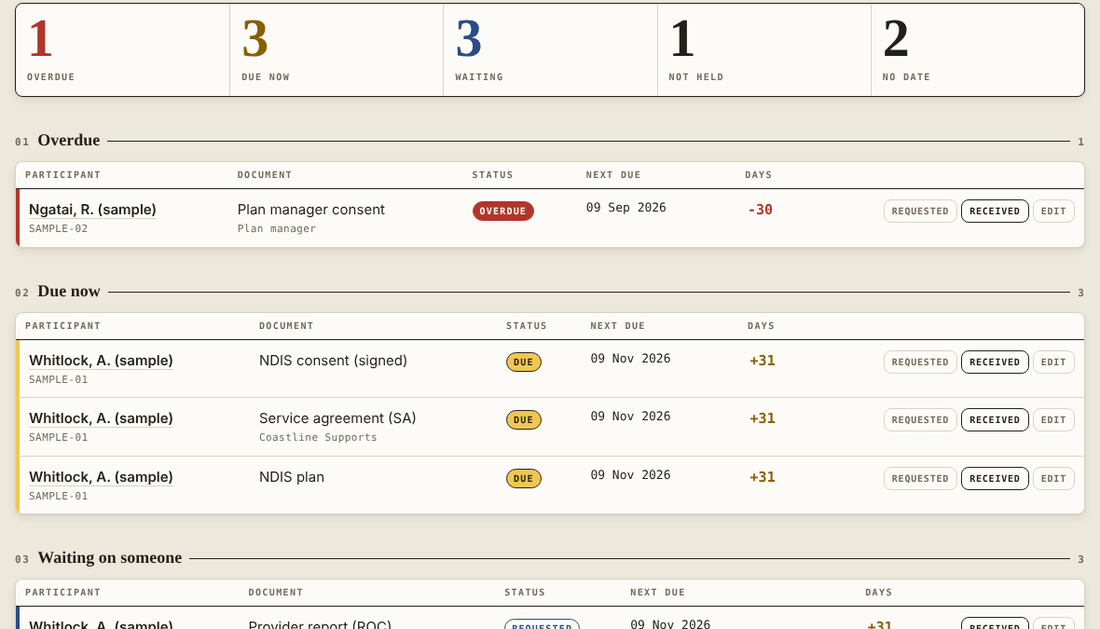
Every document you hold for a participant, when it was received, and when it stops being current. Sorted into five lists that re-sort themselves as the dates move.
-
Notice periods that bend per participant
Six weeks is the register default. Any participant can override it, and any single document can override the participant. The one that needs three months gets three months without moving everyone else.
-
The pile a plan review drags with it
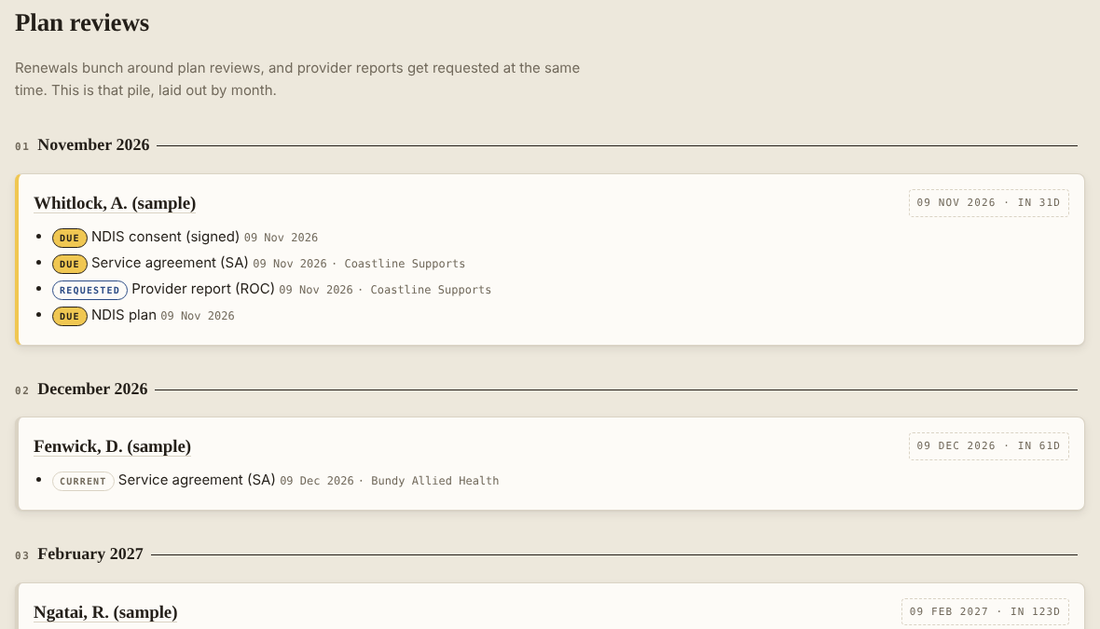
Renewals bunch around plan reviews, and provider reports get requested at the same time. The Plan reviews view lays that out by month, so the bunching is visible in October rather than discovered in November.
-
Eight document types, all editable
NDIS consent, NDIS plan, plan manager consent, onboarding pack, portal access, service agreement, schedule of supports, provider report. Rename them, change the terms, add your own. Nothing in the tool depends on the names it ships with.
-
A change log you can hand to an auditor
Who added, edited, deleted or archived what, and when, to the last 500 entries, exportable as its own CSV. Attribution is a typed initials field, not a sign-in, and the tool says so rather than implying more than it has.
-
Names optional
Use a reference instead if your office prefers, and the register works the same. A privacy toggle in the top corner hides full names on screen for when someone is standing behind you.
-
Export and print
CSV of the outstanding list, CSV of everything, CSV of the change log, and a print layout that holds its structure on paper. Your data leaves whenever you want it to, in a format anything can open.
02Where your data lives
In your browser, on your device. That is the whole answer, and it is the reason the tool exists in the shape it does.
-
It stores no documents
There is no upload button, and no field in the data model that could hold a file. Every record is a fact about a document — type, dates, status, who it sits with — plus a note of where the real file already lives.
-
It makes no network calls
No account, no server, no analytics, no fonts loaded from anywhere. Version 1.0 was opened in a real browser with every request logged: it made exactly one, for itself.
-
Nobody at this end can see it
Not “will not” — cannot. There is no copy of your register anywhere but your own machine, which also means support cannot look at it for you when something goes wrong.
-
It comes with a compliance note
A four-page Privacy and Compliance Note ships with the file, written to be read and signed off by whoever asks these questions at your organisation, rather than written to reassure you.
03Not cleared for
A maintenance release lists what the aircraft is not approved to do, in the same type as everything it is. Read this part before you buy rather than after.
-
More than one person at a time
One device, one copy, one browser. Three coordinators cannot work from the same register, and two copies will drift apart within a week. There is no sync and no server to sync to. If your office needs a shared view, this is the wrong tool and no setting will change that.
-
Holding the documents themselves
It tracks facts about documents and points at where the file already lives — a folder path, a system name, whatever you type into the note. If what you need is somewhere to put the signed PDFs, that is a document management system, and this is not one.
-
Emailed or pushed reminders
Reminders are there when you open it, not in your inbox at seven in the morning. Sending email needs a server, a server needs your participants’ details on it, and that is exactly the trade this tool was built to avoid.
-
Saying whether you are compliant
It shows what is held, what is due and what is missing. Whether that adds up to meeting your obligations is your call, your organisation’s and your auditor’s. Nothing it produces is legal or regulatory advice, and no number of green ticks would change that — which is why the tool does not have any.
-
Replacing a platform you already pay for
If your provider already runs a practice management system, it very likely does some version of this alongside rostering and invoicing. Use that. Do not pay twice for the same job.
-
Being right about dates you got wrong
It holds what someone typed into it. Wrong dates in, wrong dates out, and it has no way to check a date against the document it describes, because it cannot see the document. It is a register of what you told it, not a source of truth about your paperwork.
04What you get
| The tool | One HTML file. Open it in any current browser. No install, no account, no internet needed after the first load. |
|---|---|
| Documentation | Quick Start, User Guide, Data Model and Technical Reference, and a Privacy and Compliance Note. Four PDFs, plus a README and the full licence. |
| Licence | One organisation, perpetual. Install it on as many of your own devices as you need — no limit and no count kept. |
| Updates | Twelve months of new builds, free. After that your copy keeps working exactly as it does now; you are only outside the window for new ones. |
| Support | Email, answered by the person who wrote it, usually within a couple of business days. |
| Refund | Thirty days, no questions, no justification needed. |
| Price | $149 AUD, once. No subscription, no per-user fee, nothing to cancel. That is the whole price — no GST is added on top. An invoice with an ABN on it comes with every purchase. |
05Questions
Can I try it before buying?
No, and here is the honest reason. It is one readable file, so a working demo would be the product. Instead of a crippled trial, there is a thirty-day refund you do not have to argue for. The screenshots above are the real tool, not mockups.
What happens if I clear my browser?
The register is gone. This is the one real risk of a tool with no server. Take the backup — it is one click in Setup and writes a small file you can keep anywhere. The tool nags you after fourteen days without one.
Can my colleague and I both use it?
Not on the same register, no. You can each have your own copy under the one licence, but they will not be in step with each other. If a shared view is what you need, buy something else — see 03 above.
Does it work on a phone?
It lays out properly down to 360px wide, so yes, it opens and reads. But a phone browser is a separate copy with separate data, so it is for looking, not for keeping the register on.
Is this an NDIS compliance product?
No. It tracks and reminds. It does not assess, certify or interpret anything against the NDIS Practice Standards, and it is not a substitute for advice from someone qualified to give it.
What if it does not do what I need?
Email and ask before you buy — you will get a straight answer, including “it does not do that” where that is true. If you have already bought, take the refund.
Can I get an invoice for my records?
Yes, with an ABN on it. Say so when you buy, or reply to the receipt and ask. It will not show GST: JCJ Creations is not registered for it, so none is charged and there is none for your bookkeeper to claim back. The $149 is simply $149.
Who supports it in five years?
Fair question for a one-person product. The answer the file gives you is better than a promise: it runs entirely in your browser with no server behind it, so there is nothing that can be switched off. If this disappeared tomorrow, your copy would keep working and your data would still be yours, in your own backup file.
06Who made it
One person in Queensland, working as a sole trader under JCJ Creations. Not a company, not a team, no investors.
It was built after a long conversation with a support coordinator about which admin task wastes the most time. The answer was not finding documents and not chasing people — it was simply knowing what was outstanding, and the fact that renewals bunch around plan reviews in a way a flat spreadsheet cannot show you. Everything in the tool follows from that, including the parts it refuses to do.
Questions, problems and feature requests all go to hello@jcjcreations.au and are answered by the person who wrote the code.